
Know when your internet was down
UptimeLogger watches your connection around the clock, records every interruption and shows you the history — so the next call with your provider is about facts, not impressions.
- Windows and macOS
- Free of charge
- No account
- No telemetry
What it does
-
Continuous monitoring
A background process probes a configurable list of servers. Timeouts and refused connections end an online stretch, a successful connection ends an outage.
-
Status in the tray
A menu-bar icon on macOS, a notification-area icon on Windows: green online, red offline. No Dock icon, no window in your way.
-
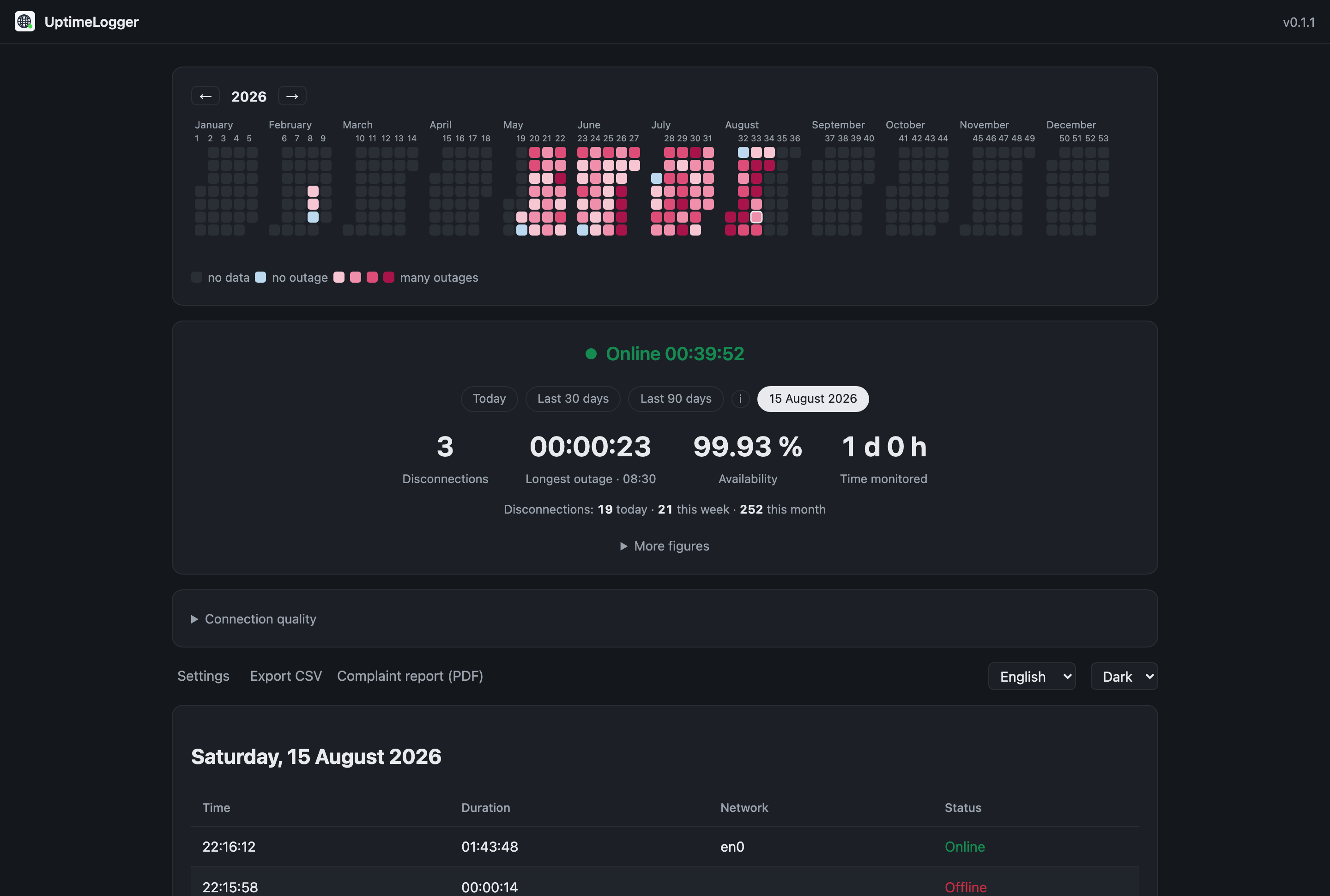
Calendar heatmap
A year at a glance. The darker a day, the more interruptions it had. Click a day and the log and the figures jump to it.
-
The figures that matter
Outages, time offline, longest outage, availability and monitored time — for today, this week, this month or any day you pick.
-
Full event log
Every online and offline stretch with start time and duration, plus the network interface and Wi-Fi name it happened on. Exportable as CSV.
-
Starts with your session
A connection log is worth as much as the time it covers, so UptimeLogger can start itself when you log in — optional, and switchable from the dashboard.
How it works
UptimeLogger opens TCP connections to a list of servers rather than sending real pings: an ICMP ping needs administrator rights on Windows, while a TCP connection works unprivileged everywhere. The default targets are public DNS resolvers addressed by their IP address, so a broken name lookup is not mistaken for a broken internet connection.
What that is worth in a conversation with your provider, and what a usable record has to contain, is set out on its own page: documenting internet outages.
Results go into a local SQLite database. The dashboard is served by the application
itself on http://127.0.0.1:17641/ and opens from the tray menu. If you want to
check on it from your phone, LAN access can be switched on — it is off by default and
protected by a token when on.
Your data stays with you
- No account, no server
- Nothing is uploaded. There is no backend that could hold your data.
- No telemetry
- The application never reports usage. Two things go out on their own: the connection
probes themselves, and — if you leave it switched on — a version check against this
website, which asks for a small static file and sends nothing about you beyond the
request itself. It can be turned off in the settings.
A third goes out only when you press a button: the speed test transfers data to and from a named provider (Cloudflare by default, changeable in the settings) to measure your line. It never runs on a schedule, and it is the only part of the application that contacts anyone you did not configure. - Local database
- macOS:
~/Library/Application Support/UptimeLogger/
Windows:%LOCALAPPDATA%\UptimeLogger\
Deleting that folder deletes every recorded event.
Questions
Does it cost anything?
No. Free of charge, no trial, no paid tier. That is meant literally and only that: the source code is not published.
Does it slow down my connection?
No. A probe opens a TCP connection and closes it again; that is a few hundred bytes every few seconds.
Why does my machine warn me when I install it?
Because UptimeLogger is not code-signed. See the installation page.
What happens while the machine sleeps?
Nothing is recorded — a sleeping machine has no connection to lose. UptimeLogger marks the gap as such rather than counting it as an outage, and waits a moment after waking before it starts recording again, so a normal Wi-Fi reconnect is not logged as an interruption.